


Target Outcome
Working AI solutions applied to your own work
Designed to automate at least 10 hours of recurring manual work every week.
10+
hours saved every week

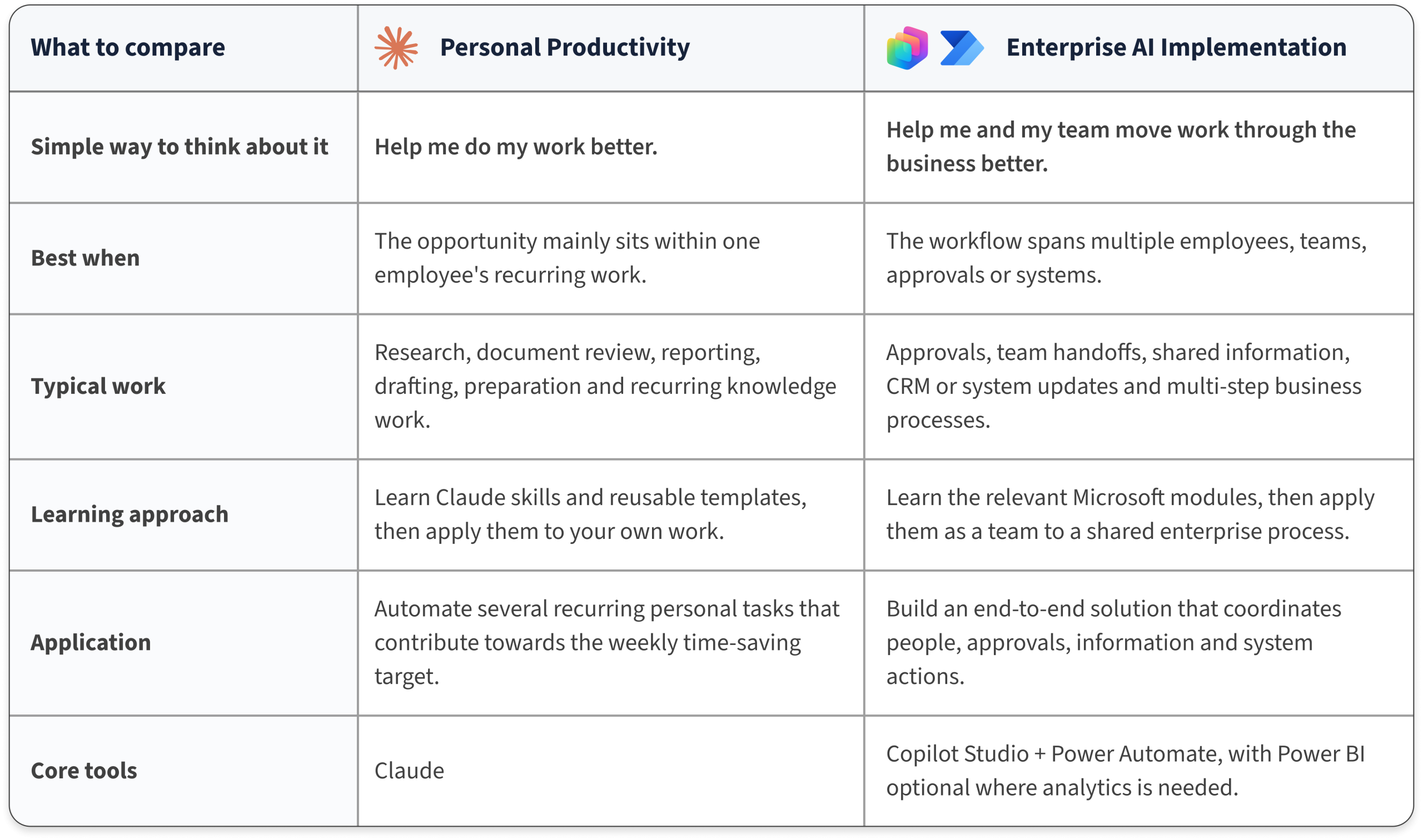
Personal Productivity
Claude Pathway

Enterprise AI Implementation
Microsoft Pathway

Part 1 : Gain the AI skills
Learn how to use Claude effectively, understand proven templates and build enough capability to start building solutions around your own work.
- Understand useful AI workflows and templates
- Learn how to provide the right instructions and context
- Practise, review, test and improve AI outputs guided examples
Part 1 : Gain the relevant skills
Learn the Microsoft modules required for the chosen business process before moving into implementation.
- Copilot Studio for AI agents and reasoning
- Power Automate for process steps, handoffs and approvals
- Relevant Microsoft and business-system connections

Part 2 : Build real solutions
Spend most of the program building and testing practical workflows around your own work. The solutions can cover several recurring tasks that together contribute towards the target of at least 10 hours saved every week.
- Select the tasks to automate
- Adapt the workflows to the way you actually work
- Test on real or realistic work examples
- Refine the solution until it is ready to use
Part 2 : Build the enterprise solution
Learners and relevant colleagues work together to build a real organisational solution around a shared workflow involving people, approvals, information and system actions.
- Design the end-to-end workflow
- Define who reviews, approves and takes action
- Connect the required information and systems
- Test, refine and prepare the solution for workplace use
Personal Productivity
Claude Pathway
Part 1 : Gain the AI skills
Learn how to use Claude effectively, understand proven templates and build enough capability to start building solutions around your own work.
- Understand useful AI workflows and templates
- Learn how to provide the right instructions and context
- Practise Review, test and improve AI outputs guided examples
Part 2 : Build real solutions
Spend most of the program building and testing practical workflows around your own work. The solutions can cover several recurring tasks that together contribute towards the target of at least 10 hours saved every week.
- Select the tasks to automate
- Adapt the workflows to the way you actually work
- Test on real or realistic work examples
- Refine the solution until it is ready to use
Enterprise AI Implementation
Microsoft Pathway
Part 1 : Gain the relevant skills
Learn the Microsoft modules required for the chosen business process before moving into implementation.
- Copilot Studio for AI agents and reasoning
- Power Automate for process steps, handoffs and approvals
- Relevant Microsoft and business-system connections
Part 2 : Build the enterprise solution
Learners and relevant colleagues work together to build a real organisational solution around a shared workflow involving people, approvals, information and system actions.
- Design the end-to-end workflow
- Define who reviews, approves and takes action
- Connect the required information and systems
- Test, refine and prepare the solution for workplace use